
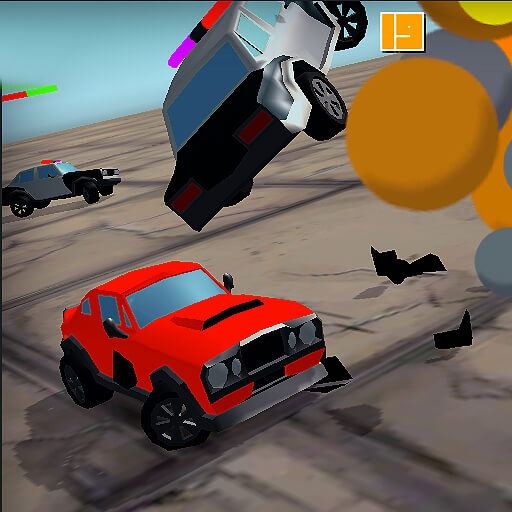
About Escape Road 2
Escape Road 2 is a browser driving game about staying on the move while police pursue your getaway car. Steer through city streets, avoid obstacles, and collect cash when the route is safe. A run ends when the police catch you, so the immediate goal is to keep a way out open rather than reach a finish line.
The sequel gives you another choice when driving is no longer working: you can leave a vehicle and look for another one. That does not make every traffic jam survivable. A useful switch depends on where you stop, how close the pursuers are, and whether another vehicle is within reach. Sometimes a brief reverse and a clear turn are safer than leaving the car.
Cash collected during the chase can unlock more vehicles with different characteristics. Think of it as progress toward future choices as well as a temptation in the current run. The best pickup is one you can reach without giving up the space needed to keep escaping.
How to Play Escape Road 2
Start the game in the player above and use the steering controls to guide your car away from police. Your surroundings and the positions of pursuing vehicles change during a run, so look beyond the obstacle directly in front of you. A turn that avoids one collision is useful only if it leaves a route for the next few moments.
- Make room early. As the chase begins, look for an open direction and steer before traffic or police close the gap.
- Drive through available space. Move around obstacles instead of committing to a narrow opening you cannot leave. If you collect cash, keep an exit in view.
- Recover or change vehicles. When blocked, consider reversing toward an opening. If the car remains trapped and another vehicle is reachable, use Space to get out and enter it.
- Keep adapting. Police pressure grows as the chase continues. Change your route as the situation develops and try to survive until the run ends.
For a first attempt, focus on recognizing when your car loses room to maneuver. You do not need to collect every item on the road. After a run, consider where the chase became difficult: did you turn too late, remain in a blocked car, or follow cash into a crowded area? Pick one decision to practice on the next attempt.
Controls & Timing
Steering before a corner
Use short adjustments when there is room to correct, and begin a turn before the car reaches a tight gap. Watch the exit as well as the entrance: a passage that looks open at its start may lead straight into another obstacle. Leave yourself enough space to respond if traffic changes.
Reversing out of a blockage
S or the Down Arrow can help you back away from an obstruction, but reversing takes time while the pursuit continues. First identify a direction to drive toward after the correction. If the space behind you is also crowded, a long reverse may leave you with fewer options than a short adjustment.
Leaving and entering a vehicle
Press Space to leave or enter a car. Before getting out, look for a reachable replacement and check the area between it and your current position. You are still in the chase while on foot; changing vehicles is a way to create another opportunity, not a pause or a guaranteed escape.
Reading a crowded route
Collisions can slow or damage your vehicle, giving pursuers time to close in. When two obstacles form a narrow passage, compare it with a wider turn nearby. The shorter line is not necessarily the safer one if a collision would leave you unable to turn again.
Controls
These are the keyboard controls listed by the game provider. If the game does not respond, click inside the game player first so it can receive keyboard input.
| Input | Action | When to use |
|---|---|---|
| A / D or Left / Right Arrow | Steer left or right. | To follow an open route and avoid obstacles. |
| S or Down Arrow | Reverse. | To back away from a blocked position. |
| Space | Exit or enter a vehicle. | To move on foot or change cars during the chase. |
Give each input a clear purpose: steer toward an opening, reverse to create room, or leave the car when a change gives you a viable route. Avoid assuming that leaving the vehicle removes the pursuing police.
High Score Tips
- Choose a route before chasing a pickup. Cash is helpful for unlocking vehicles, but it is rarely worth driving into a crowded corner. Look at what lies beyond the pickup before committing to it.
- Turn while there is still space. Waiting until a building, vehicle, or police car fills the road leaves little room to correct. An earlier turn can preserve more than one direction of escape.
- Watch for a second obstacle. The first opening is only part of the route. Check where it leads so that avoiding one crash does not put the car immediately against another object.
- Use reverse to solve a specific problem. Back away when it creates space for a turn, then move toward that opening. Reversing without a plan can spend valuable time in the same congested area.
- Treat a vehicle change as a decision. If the car is boxed in, compare the chance of driving out with the distance to another vehicle. Leave when a reachable replacement offers a better path, not simply after every collision.
- Give up an unsafe line. If pursuing vehicles are already filling the route to a cash pickup or narrow gap, look for another direction. A longer route can be more useful if it preserves movement.
- Learn from the end of each run. Identify the moment your options narrowed, not just the final collision. Practicing that earlier choice is more actionable than trying to repeat the same last-second escape.
Key Features
- A continuing police chase. Stay free for as long as you can while the pursuit becomes more demanding.
- Driving and on-foot decisions. Leave a vehicle and look for another when the situation calls for a change.
- Unlockable vehicle choices. Collect in-game cash to open more vehicles with different characteristics.
- A changing road situation. Traffic, obstacles, and pursuing vehicles make route selection part of each attempt.
Frequently Asked Questions
What is the goal of Escape Road 2?
Stay ahead of the police for as long as possible. Steer around obstacles, make use of open routes, and collect cash when doing so does not put the getaway at risk. The run ends when you are caught.
How do I get out of a car and enter another?
Press Space to leave or enter a vehicle. Look for another car you can reach before exiting, and pay attention to the police around you: being on foot does not stop the pursuit.
What should I do when my car is stuck?
First look for space behind or beside the car. If a short reverse opens a driving route, try that; if the car remains boxed in, consider leaving for a reachable replacement. Neither choice guarantees a safe escape.
How is Escape Road 2 different from the first Escape Road?
The sequel lets you exit a vehicle and enter another during the pursuit. It also offers a larger vehicle collection and a more aggressive chase, according to the game provider.
What is cash used for?
Cash helps unlock more vehicles. Their characteristics differ, so collecting money gives you more choices for later runs. You can skip a pickup when reaching it would put the current escape in danger.
Is it better to stay in a damaged car?
It depends on the space around you. A car that can still reach an open road may be a better option than stepping into nearby police. When it is trapped and another vehicle is reachable, switching can offer a new route.
Why are the keyboard controls not responding?
Click inside the game player and try the controls again. If the game is still loading, wait for its screen to appear before using the keys. The controls described above apply to the keyboard version provided in the embedded game.